
🎥 Prefer a quick walkthrough?
Watch the step-by-step video guide.
Understanding Transfers
A transfer moves cash from one drawer to another. It is not considered income or an expense—it’s an internal cash movement.
Common Transfer Scenarios
- End-of-Shift Consolidation: Move cash from registers to the main safe.
- Startup Cash Distribution: Fund each drawer from the safe at the start of a shift.
- Balancing Drawers: Move excess cash from busy registers to those running low.
- Petty Cash Management: Transfer petty cash to a central location.
Practical Benefits
- Keep all drawer balances accurate.
- Track internal cash movements.
- Maintain a clear audit trail.
- Simplify end-of-shift reconciliation.
- Streamline cash distribution across locations.
How Transfers Work
A transfer moves cash from one drawer to another, updating both balances automatically.
- From (Source) Drawer: The drawer where cash is taken out.
- To (Destination) Drawer: The drawer that receives the cash.
Automatic Balance Updates:
- The From Drawer balance decreases by the transfer amount.
- The To Drawer balance increases by the same amount.
How to Create a Transfer
Step 1: Start a New Transfer
-
Select the Source Drawer
-
Go to Settings → Drawers and choose the drawer where cash will be taken out.
-
This drawer’s balance will decrease automatically.
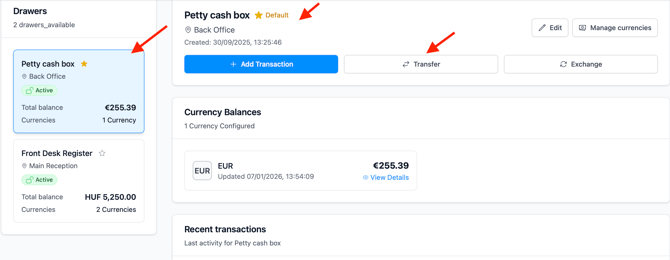
Alternatively: From the Dashboard, click Add Transaction (which will take you to the Transactions page) and select the drawer you want to withdraw cash from.

-
-
Click “Transfer” to begin moving cash to another drawer.
Step 2: Enter Transfer Details
- Select the currency of the cash taken out from: Both drawers must support this currency
- Select the drawer that receives the cash (Destination Drawer)
- Select the currency of the cash drawer you are moving money to: Both drawers must support this currency
- Add the amount
- Add description:
- Why this transfer is being made
- Example: "End of shift consolidation"
Step 3: Verify and Save
- Confirm "From" and "To" drawers are correct
- Verify the amount
- Check currency
- Click “Complete Transfer”
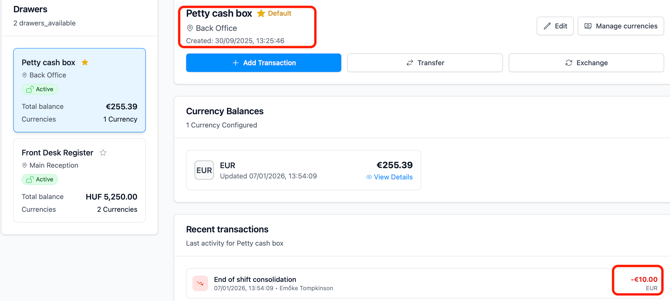
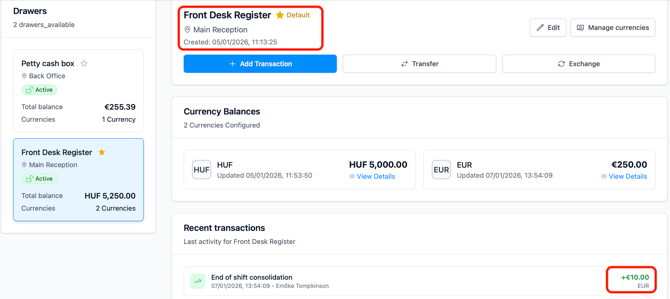
- Both drawer balances update immediately
Important Transfer Rules
- Sufficient Funds - Cannot transfer more than available balance
- Different Drawers - Cannot transfer to the same drawer
- Both Support Currency - Both drawers must support the currency
- Audit Trail - All transfers are permanently recorded
- Reversible - Can create another transfer to reverse (if needed)
Using Transfers Between Drawers
Drawer-to-drawer transfers let you move cash safely and accurately between drawers. They are commonly used during daily operations, shift changes, and cash consolidation, while ensuring every movement is fully tracked.
Common Use Cases
End-of-Shift Consolidation
Move cash from individual drawers into a main safe or primary drawer when closing a shift.
Opening Cash Distribution
Distribute starting cash to drawers at the beginning of a shift so each register has the correct opening balance.
Balancing Drawers During the Shift
Transfer cash between drawers to prevent overfilled tills or support drawers running low.
Multi-Currency Handling
Move specific currencies between drawers to consolidate or redistribute foreign cash.
Recommended Workflow
Start of Shift
Begin by checking balances across all drawers and confirming opening cash is in place. Use transfers to correct any shortages or excess amounts before operations begin.
During the Shift
Monitor drawer balances throughout the day. Transfer excess cash out of busy drawers and top up those running low, ensuring every movement is properly recorded.
End of Shift
Count the physical cash in each drawer and compare it with system balances. Resolve any discrepancies, then transfer cash to the main safe or closing drawer and record all transfers.
Example: End-of-Shift Consolidation
Imagine you are closing a shift with three active drawers and need to consolidate all cash into the main safe:
- Bar Till 1: EUR 250.00
- Bar Till 2: EUR 180.00
- Front Desk Register: EUR 320.00
To complete the consolidation:
- Transfer EUR 250 from Bar Till 1 to the Main Safe.
- Transfer EUR 180 from Bar Till 2 to the Main Safe.
- Transfer EUR 320 from the Front Desk Register to the Main Safe.
After the transfers, all three drawers have a zero balance, and the Main Safe holds all cash.
Each transfer is recorded individually, providing a complete and transparent audit trail.