
Cash Drawer can be used by multiple team members at the same time. Access is granted to SabeeApp account Owners and Operators, each with different permissions.
Owner Role
Owners have full control over the Cash Drawer. They can:
- Record and edit transactions
- Generate and update owner PINs
- Create temporary access PINs for operators
- Add or edit drawers
- Add new transaction categories
- Add new currencies to drawers and adjust currency thresholds
- Set the default currency for a drawer
- Perform reconciliation and record balance checks
Tip: Owners are responsible for ensuring the Cash Drawer is accurate and properly maintained.
Operator Role
Operators can perform most daily tasks, but with limited permissions:
- Record transactions freely
- Cannot edit saved transactions without a temporary PIN
- Can request a temporary access PIN from an owner if needed
- Cannot add new drawers
- Cannot add new transaction categories
- Can perform reconciliation and record balance checks
Note: Operators are ideal for team members who handle day-to-day cash transactions but don’t need full administrative access.
Key Differences Between Owners and Operators
| Feature | Owner | Operator |
|---|---|---|
| Record transactions | ✅ | ✅ |
| Edit transactions | ✅ | ❌ without owner PIN |
| Add/edit drawers | ✅ | ❌ |
| Add transaction categories | ✅ | ❌ |
| Add currencies & adjust thresholds | ✅ | ❌ |
| Set default currency | ✅ | ❌ |
| Generate temporary PINs | ✅ | ❌ |
| Reconcile & record balance checks | ✅ | ✅ |
PIN code management
Each transaction, transfer, or exchange is automatically dated and linked to the user who created it. Most transaction details are set at the time of recording.
By default:
- Owners can record and edit transactions, generate PINs, and provide temporary access
- Operators can record transactions but cannot edit saved transactions without an owner-issued PIN
When a PIN code is required
A PIN code is required to edit a saved transaction or perform actions that require additional authorization. There are two types of PIN codes:
-
Owner PIN code
Set in Property Settings → Security Settings. Only the account owner should use this PIN.
-
Temporary access PIN
Generated by the owner and provided to an operator when temporary authorization is needed.
Actions requiring authorisation
A PIN code is required when performing actions such as:
- Changing a transaction’s category
- Editing the amount or currency
- Modifying any other transaction details
- Performing any action that displays an Authorization Code required message
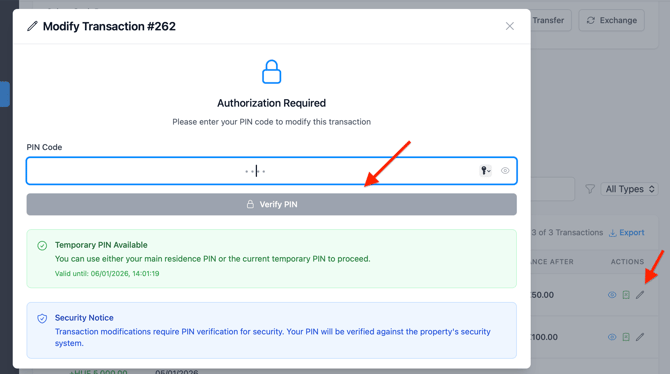
Example authorization prompt
When a PIN is required, Cash Drawer displays an Authorization Code required message prompting you to enter a valid PIN.
Set or update the owner PIN code
Owners use a PIN to authorize edits to saved transactions
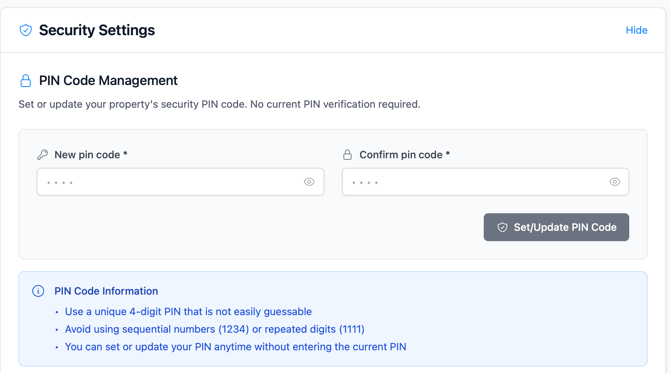
To set or update your PIN:
- Go to Settings → Property Settings → Security Settings
- Locate the PIN Code Management section
- Enter a 4-digit PIN in New PIN code
- Re-enter the same PIN in Confirm PIN code
- Click Set/Update PIN
A confirmation message appears once the PIN is saved. Owners can change the PIN at any time by returning to this section and repeating the steps.
PIN Best Practices
- Choose a PIN that is memorable but not obvious
- Do not share your PIN with others
- Change your PIN regularly (every few months)
- Avoid common sequences like
1111or1234 - Use a combination of numbers you can easily remember
Generate a temporary access PIN
Important: Only owners can generate temporary PINs, which can be used by themselves or shared with operators.
To generate a temporary access PIN:
- Click the clock icon in the Cash Drawer header.

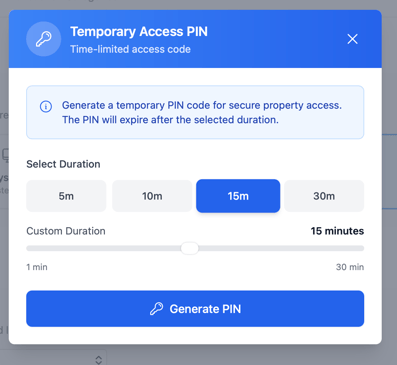
3. Select the PIN validity duration: 5, 10, 15, or 30 minutes
4. Click Generate PIN.
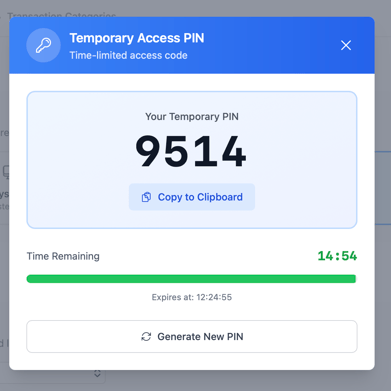
-
- Enter it where needed (e.g., editing a transaction), or
- Share it with an operator who needs temporary access