What is Safe Mode?
Safe Mode is a privacy and security feature for specific drawers. When enabled Operators can add transactions but cannot view balances or transaction history for that specific drawer.
In many operations, different roles require different levels of visibility. For example, front desk staff may need to transfer funds (e.g. moving daily revenue to a safe), but should not be able to see the total balance of secure drawers.
Safe Mode supports this by:
- Restricting access to balances and transaction details
- Allowing operational tasks without exposing sensitive data
- Enabling clear separation of responsibilities between roles (e.g. front desk vs. finance staff)
This helps improve both financial security and day-to-day efficiency.
Who can enable Safe Mode?
Safe Mode can only be managed by:
- Owners
- Managers (operators with account management permission, which is set in SabeeApp PMS)
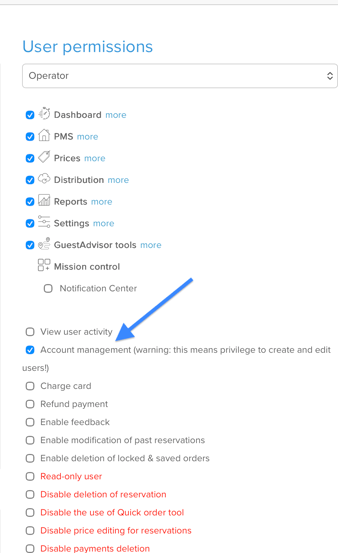
Operators without owner or manager permissions in SabeeApp cannot enable or disable this setting.
How to enable or disable Safe Mode
You can manage Safe Mode when creating a new drawer or editing an existing one.
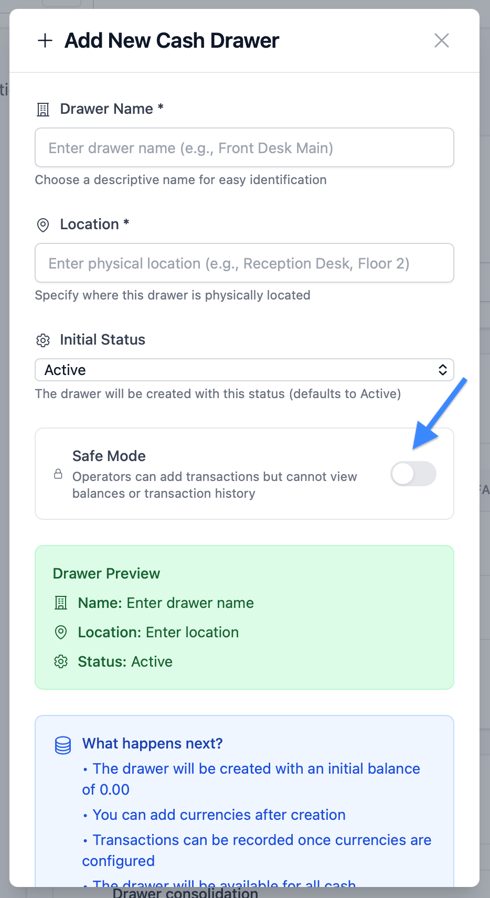
When creating a new drawer
- Open the Add New Drawer form
- Locate the Safe Mode toggle
- Switch it on or off as needed
- Save the drawer
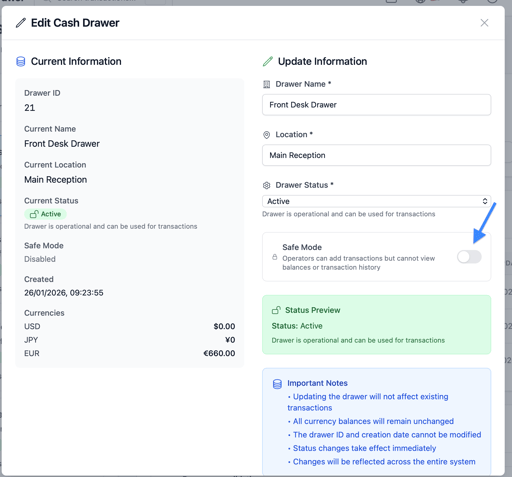
When editing an existing drawer
- Open the Edit Drawer panel
- Toggle Safe Mode on or off
- Save your changes
What happens when Safe Mode is enabled?
Safe Mode changes what non-owners can see and do within a drawer.
For users who are not the drawer owner or without account manager permission
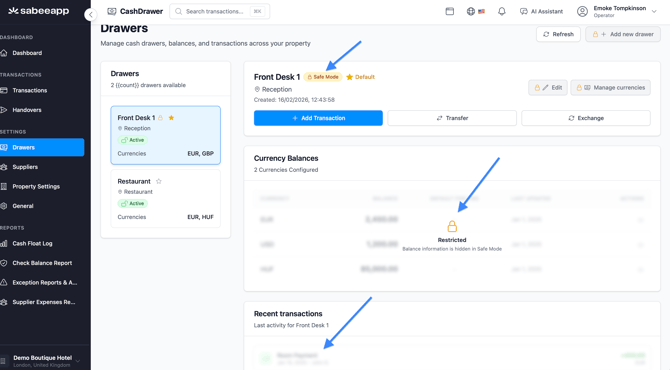
- A lock icon (amber) appears next to the drawer name
- A Safe Mode badge is displayed in the drawer header
- The balance table is hidden behind a blurred overlay with a lock icon and message
- The transaction history is hidden in the same way
- All action buttons are disabled
- Transaction can be recorded
- Balances on the Dashboard only shows for those drawers where they have full control over, meaning the safe mode is not on.
For owners and managers
There is no change to functionality:
- All financial data remains visible
- All actions are available
Visual indicators at a glance
When Safe Mode is active, you can quickly identify it by:
- Lock icon next to the drawer name
- Safe Mode badge in the header
- Blurred sections for balances and transactions
Example view when safe mode is on for a drawer:
For Owner and Manager with account management permission:
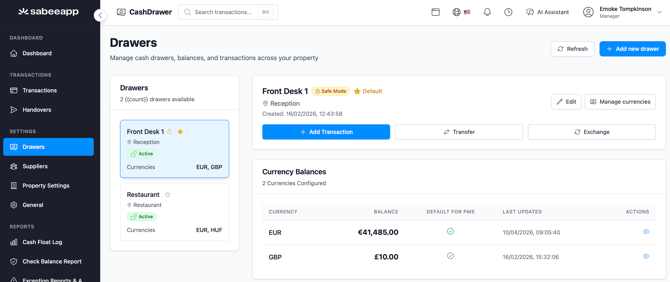
For Operators: