
🌍 GDS Distribution via Reconline
Overview
GDS (Global Distribution System) distribution is a powerful channel designed especially for independent hotels looking to expand their reach in the corporate and high-value leisure segments. Through Reconline, your property gains access to major GDS networks, including Amadeus, Sabre and Travelport (Galileo and Worldspan).
Why GDS Matters
-
Corporate travel is back
More companies are reinstating managed travel programs and requiring policy-compliant bookings. -
Bleisure is booming
30–40% of business trips now include leisure extensions (Amadeus data). -
Affluent leisure demand
Nearly 30% of GDS bookings now come from high-spending leisure travelers (Amadeus, Sabre). -
High ROI channel
With a lower cost per acquisition than OTAs, GDS delivers one of the strongest returns — second only to direct bookings.
How to Connect to Reconline
Follow the steps below to activate the connection in your SabeeApp account.
Step 1: Locate the Channel
-
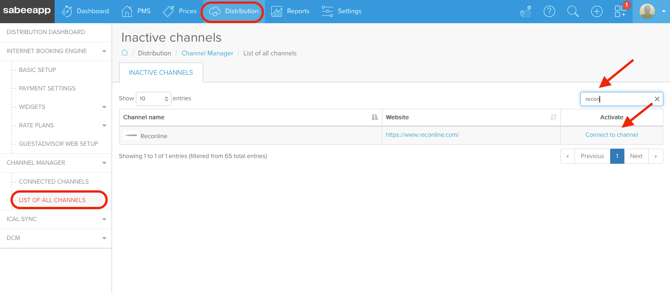
Log in to your SabeeApp account.
-
Navigate to:
Distribution → Channel Manager → List of all channels -
Search for Reconline.
-
Click Connect to channel.
Step 2: Complete the Configuration
After clicking connect, the configuration table will open.
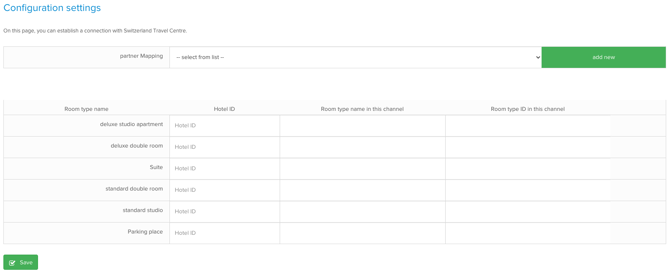
If Reconline has not been added yet, click Add New (next to partner mapping) to create it.
When setting up the partner, be sure to select Partner type: OTA (Online Travel Agency).
Please fill in all other required fields.
💡 Tip:
If you do not know your Room Type ID in the channel, simply enter a-(dash) symbol.
Once all required information is completed, click to confirm.
Our team will then begin the connection process.
Important: Reconline Extranet Setup
Before the connection can be finalized:
👉 Please add SabeeApp as your Channel Manager Provider in the Reconline extranet.
This step is required to enable synchronization.
After the Connection Is Established
Once the connection with Reconline is successfully set up, our team will notify you.
From the moment synchronization goes live, the following data will be automatically synced:
🔄 Synced Information
-
Availability
-
Prices
-
Minimum Stay Restrictions
📥 Reservations
-
New reservations made via Reconline will automatically appear in your SabeeApp calendar.