
How to Sync Multiple Rooms from One SabeeApp Room Type to a Single Airbnb Listing
Overview
If you want SabeeApp’s Channel Manager to send availability from multiple rooms (under a single Room Type in SabeeApp) to one Airbnb listing, the listing must be set up as a hotel-style property eligible for room-type inventory.
Airbnb’s room-type inventory feature allows a single listing to represent multiple identical rooms, so availability is shared across all units.
⚠️ Important: This is determined by Airbnb’s property classification (hotel-style property eligibility), not the Listing type, like “Entire place / Private room / Shared room” setting.
Supported Airbnb Property Categories
To enable multi-room inventory synchronization, your Airbnb listing must be classified as one of the following hotel-style property categories:
-
Aparthotel
-
Hotel
-
BnB
-
Heritage hotel
-
Boutique hotel
-
Hostel
-
Lodge
-
Pension
-
Pousada
-
Resort
-
Ryokan
-
Serviced apartment
-
Farmstay
-
Casa particular
-
Minsu
-
Timeshare
Only these property categories allow multiple units from a single SabeeApp Room Type to sync under one listing. Other property types, such as “House” or “Apartment,” do not support room-type inventory on Airbnb.
Steps to Enable Multi-Room Inventory
-
Log in to your Airbnb account.
-
Open the listing you want to configure.
-
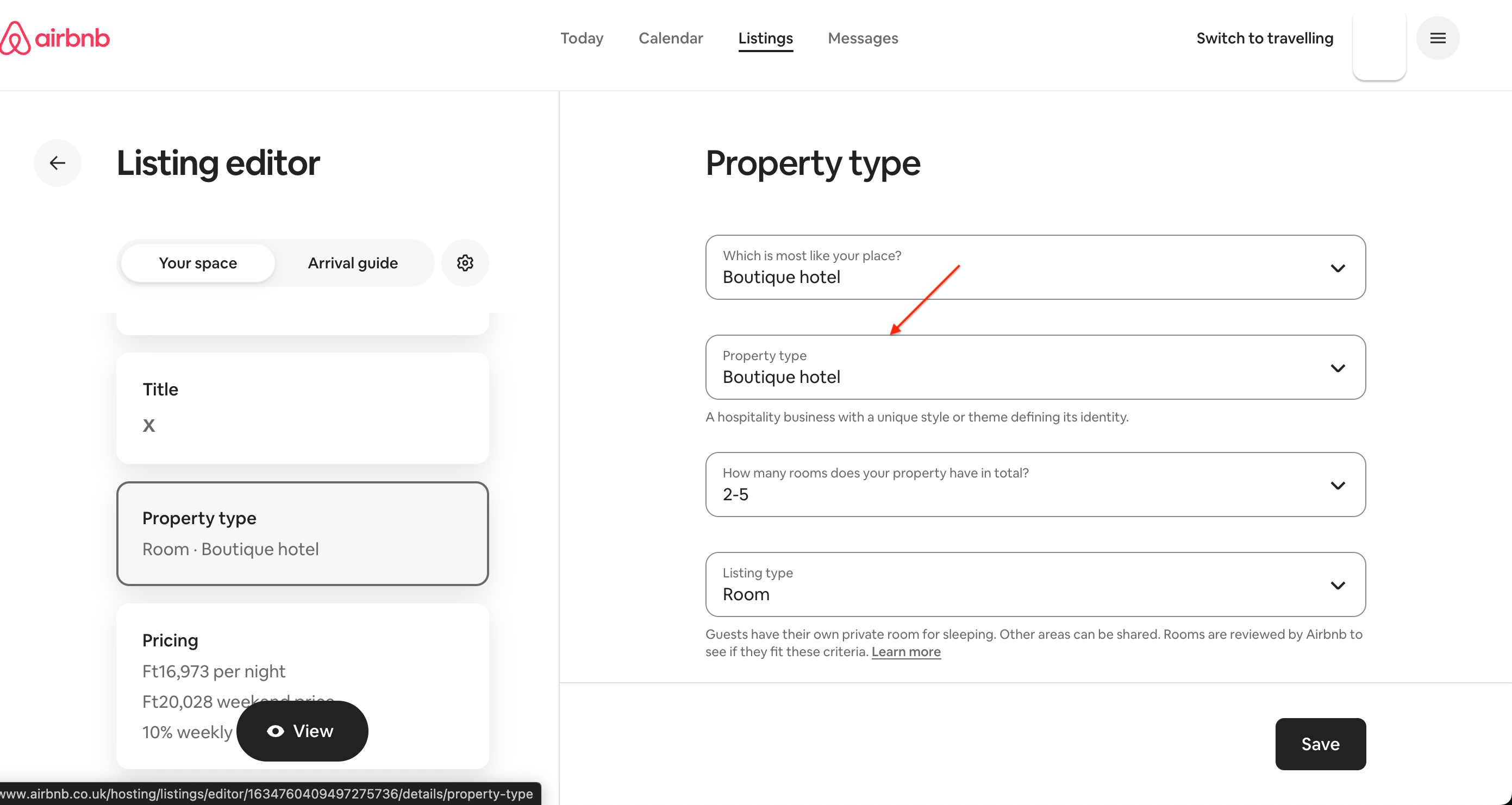
Go to Listing Editor
-
Check the Property Type
-
Change it to one of the supported hotel-style property categories listed above, if necessary.
-
Ensure your SabeeApp Room Type contains multiple rooms under the same category.
-
Once correctly configured, SabeeApp’s Channel Manager will synchronize availability from all rooms in that Room Type to the Airbnb listing.
Important Notes
-
This setup is required only if you manage multiple physical rooms under a single Room Type in SabeeApp.
-
Listings that are not hotel-style will only support single-unit availability, and multi-room sync will not work.
-
Any changes must be made directly in Airbnb, as SabeeApp cannot alter the Airbnb property classification.
-
The “Entire place / Private room / Shared room” guest-access setting does not control inventory capability. Only the property classification determines eligibility.
✅ Summary
To allow multiple SabeeApp rooms to sync to a single Airbnb listing:
-
Set your Airbnb listing to an eligible hotel-style property category.
-
Make sure your SabeeApp Room Type contains multiple rooms.
-
SabeeApp will then synchronize availability for all rooms under that listing.