
This article explains the difference between Reservations in Progress and Unfinished Reservations in SabeeApp, how they appear in the system, and how they affect your availability.
What is a Reservation in Progress?
A Reservation in Progress appears in your Sabee Calendar as a light blue entry. This status is created when a guest is completing a reservation through your own booking engine and has reached the final step of the process, where they enter their contact and payment details.
At this stage, SabeeApp temporarily blocks the selected room to ensure that no other guest can book the same room at the same time.
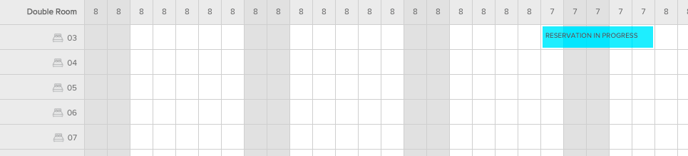 Key characteristics:
-
Displayed in the Calendar view
-
Shown in light blue
-
Indicates the guest is on the final booking step
-
Blocks the room for up to 10 minutes
-
Prevents double-booking during checkout
-
Automatically removed if the guest does not complete the reservation
-
If finished successfully, it becomes a confirmed booking
This mechanism guarantees that guests can complete their booking with confidence, knowing the room they selected is secured for them during the process.
What is an Unfinished Reservation?
An Unfinished Reservation is created when a guest reaches Step 3 of the booking engine (providing contact information) but does not continue to the final confirmation and payment step.
At this point, SabeeApp saves the information, but does not block any room in your calendar.
Key characteristics:
-
Appears in PMS → List View
-
Does not appear in the Calendar
-
Does not affect availability
-
Created when the guest enters contact details but does not proceed further
-
Remains until automatically cleaned up or removed manually
Because the booking process was not completed, these reservations serve only as informational records and do not restrict your inventory in any way.
Summary of Differences
| Feature | Reservation in Progress | Unfinished Reservation |
|---|---|---|
| Where it appears | Calendar (light blue) | PMS → List View |
| Booking step | Final step (payment & contact details) | Step 3 (contact details only) |
| Blocks availability | ✔ Yes | ✘ No |
| Duration | Up to 10 minutes | Until cleanup or manual removal |
| Created from | Your booking engine during checkout | Guest enters contact info but does not proceed |
| Becomes a confirmed booking? | If completed | No |
Important Note
These features apply only to reservations initiated through your own booking engine. Bookings coming from other channels do not use the Reservation in Progress or Unfinished Reservation statuses.