![logo_sabeeapp_offwhite.png]](https://www.sabeeapp.com/hs-fs/hubfs/logo_sabeeapp_offwhite.png?height=40&name=logo_sabeeapp_offwhite.png)
Handling No-Show Reporting with Booking.com
Booking.com recently updated their API functionality, allowing SabeeApp to send more reservation updates to their platform. These changes bring new ways to handle no-show reporting and date modifications (effective from March, 2025).
Changes in No-show Reporting
With the recent updates, Booking.com can now recognize if no-show fees have been waived in SabeeApp. Here’s how you can manage no-show reporting:
How It Works:
When you mark a reservation as No-show in SabeeApp, you will now have the option to either Apply or Don’t apply the no-show fees.
Example of No-show Fee Options in SabeeApp
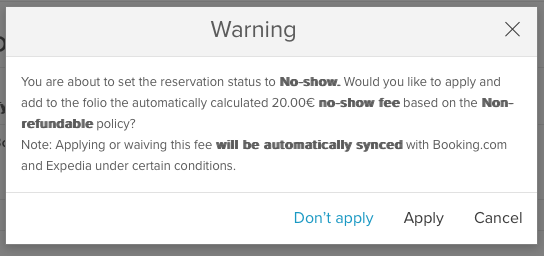
- Apply: The no-show fees are applied and will be communicated to Booking.com.
- Don’t apply: The no-show fees will be waived, and this information will also be sent to Booking.com.
Previously, Booking.com could only recognize when a guest was marked as a No-show, but now the system also reports if the no-show fees were waived.
Important Notes:
- Booking.com No-show Policy:
-
Booking.com only supports marking guests as No-show 1 day after the check-in date.
For example, if a guest was scheduled to arrive on the 24th, they can only be marked as a No-show on the 25th.
-
In SabeeApp, you can mark a guest as No-show starting on the day of check-in. However, if this happens, Booking.com will not be notified, as they don't support same-day no-shows. In this case, the user must manually mark the guest as No-show on the Booking.com platform.
-
- Freeing Up Availability:
- If a guest is marked as a No-show, and their reservation was for multiple nights, the remaining nights will be marked as available again in SabeeApp and will automatically sync with Booking.com (and other connected channels).
- No-show Deadline:
- For Booking.com to accept No-show indicators, they must be marked at least 1 day after check-in and no later than 48 hours after check-out.