
Starting 2 December 2025, SabeeApp introduces a new security feature that allows you to control the countries from which each user can log in.
This ensures that only authorized users in approved locations can access your property’s data. To avoid being unexpectedly locked out of your SabeeApp account, please configure all countries you plan to log in from by 16 December 2025.
Below is a step-by-step guide explaining how this feature works and how to manage it.
What is Login Location Control?
Each SabeeApp user can have one or more allowed countries assigned to their profile.
The user will only be able to log in if they are accessing SabeeApp from one of these approved countries.
Who Can Manage Allowed Countries?
- Owners can edit their own allowed countries in the My Profile menu.
- Operators with account management permission and Owners can set the allowed countries for:
- Operators
- Housekeeping users
- Visitors
Regular users cannot change this setting for themselves.
How to Manage Allowed Countries
For Your Own Profile (Owner users)
- Go to My Profile
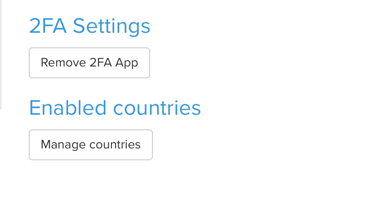
- Find the Enabled Countries / Manage countries section
- Add or remove countries as needed
- Save the changes
For Other Users
Owners and operators with account management rights can set allowed countries for other users.
- Go to Accounts → User Management
- Select the user
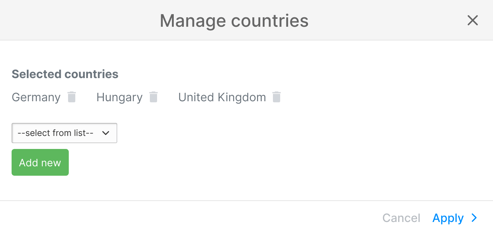
- Scroll down to Enabled Countries and click on Manage countries
- Select which countries you want to add and click Ok (Apply)
- Save the updates
Default Settings for Existing Users
Existing Users
To make the transition smooth, two countries has been automatically added to all current users:
- The company country
- The property country
These serve as initial safe defaults so no one loses access unexpectedly.
Login Behaviour After the Grace Period
This feature is introduced on the 2nd of December, 2025 with a two-week grace period, allowing all accounts to configure the correct settings (company and property country selected as the default allowed country) before the restriction is enforced.
Once the feature is fully active (16th of December):
➡️ A user can only log in if their current country is allowed in their profile.
If not, SabeeApp will block the login attempt and display a warning.
Error Message When Login Is Blocked
From 16th December 2025, if a user tries to log in from a country not allowed for their profile, they will see the following error message:
“You’re trying to log in from a location that isn’t allowed for your profile.
Contact your account owner or an authorised operator to request access.”
Tips for Smooth Setup
- Make sure all users who travel frequently have the necessary countries added.
- Update allowed countries in advance if someone will temporarily work from abroad.
- If a login is mistakenly blocked, simply adjust the user’s allowed countries or contact Support for assistance.
Creating New Users
When an owner or a permissioned operator creates a new user, the following countries are automatically preselected:
- Company country
- Property country
Please make sure to add any additional countries from which you want the user to be able to log in.