
SabeeApp allows you to manage language settings in two places:
- Login Page – Choose the language for SabeeApp’s menus before you log in.
- Inside SabeeApp – Configure multilingual content for your guests via the Languages menu under Settings → General Settings. Here you can:
- Set the languages used in the software interface.
- Choose languages for features such as invoicing, email templates, and the Internet Booking Engine.
This article guides you through choosing your preferred language for SabeeApp menus:
Selecting Your Language on the Login Page
SabeeApp PMS supports multiple languages, including English, Hungarian, German, Lithuanian, Thai, Greek, and Spanish.
To select your preferred language before logging in:
- Go to the login page.
- Scroll to the bottom of the page.
- Select your desired language.
- Enter your login credentials and sign in.
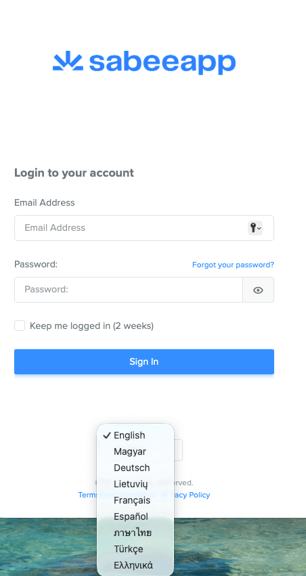
To switch languages after logging in:
- Log out of SabeeApp PMS.
- On the login page, scroll down and select a new language.
- Log back in with your credentials.
This ensures the interface loads correctly in your chosen language.
For configuring language settings inside SabeeApp for guest communication, invoicing, or other features, please refer to this help article.