
How Guests Can Access Their Room with the Smart Lock
To access your room, follow these steps:
1. Download the GuestAdvisor App
- Available for both platforms:
- Important: Make sure you complete the online check-in before your arrival.
- You can do this via the app or using the Customer Portal link.
- Note: Completing check-in through either method won’t affect the entry process.
2. Day of Arrival
- After completing the online check-in, your host will enable the NUKI lock on your room door for access.
- Please bare in mind that the door open becomes available on your day of arrival based on the property’s check-in policy. The only exception is if you have agreed on an early check-in time and your host configured this for you in their management platform.
3. Accessing Your Room via the App
-
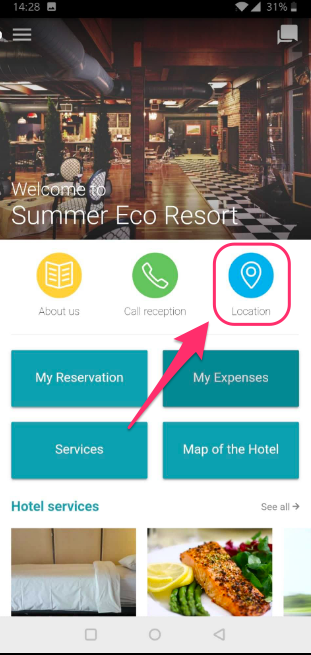
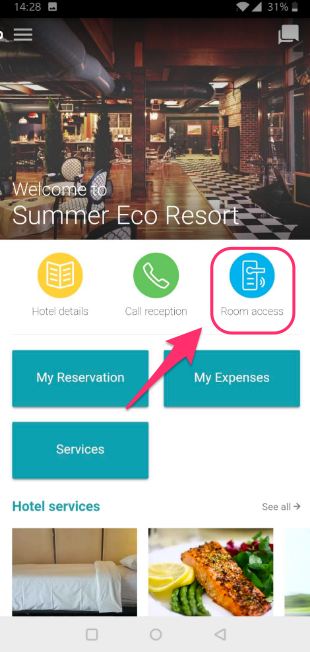
Open the app, and on your dashboard, the Location button will update to Room access on the day of your arrival.
Before:
After:
4. Unlock Your Door
-
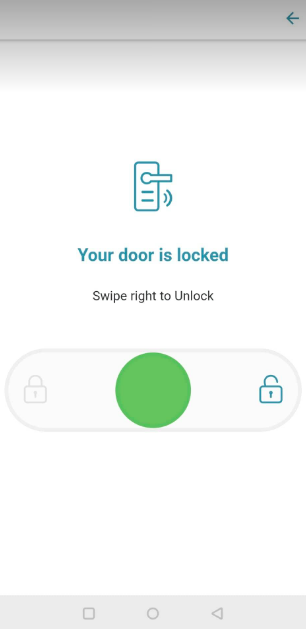
After verification, you’ll see the switch panel:
-
Swipe right to unlock the door.
-
Swipe left to lock the door.
Need Help?
If you encounter any issues, please contact your host for assistance and further guidance.